Pages

Monday, 16 June 2014

JABRA ROX™ WIRELESS

  • Wireless Technology: Bluetooth Supports Bluetooth™ for wireless connectivity
  • Bluetooth 4.0
  • NFC: Yes
  • Dolby Digital Plus
  • IP52 water resistance
  • Speakers with a hifi frequency sound produce a sound range well suited for realistic sound reproduction
  • Digital Signal Processing (DSP) is a technology that digitally optimizes your voice and music and suppresses echoes
  • Enhances call clarity by eliminating background noise from the office.
  • Standard (STD) variation microphone sensitivity is comparable to a normal telephone receiver and is used in most telephone devices.
  • Talk Time: Up to 5.5 hours
  • Standby Time: Up to 432 hour(s)
  • Music Play Time: 6 hour
  • USB Charging: Yes
  • Weight: 0.67oz /19g
  • Color: black, White
Ergonomic design
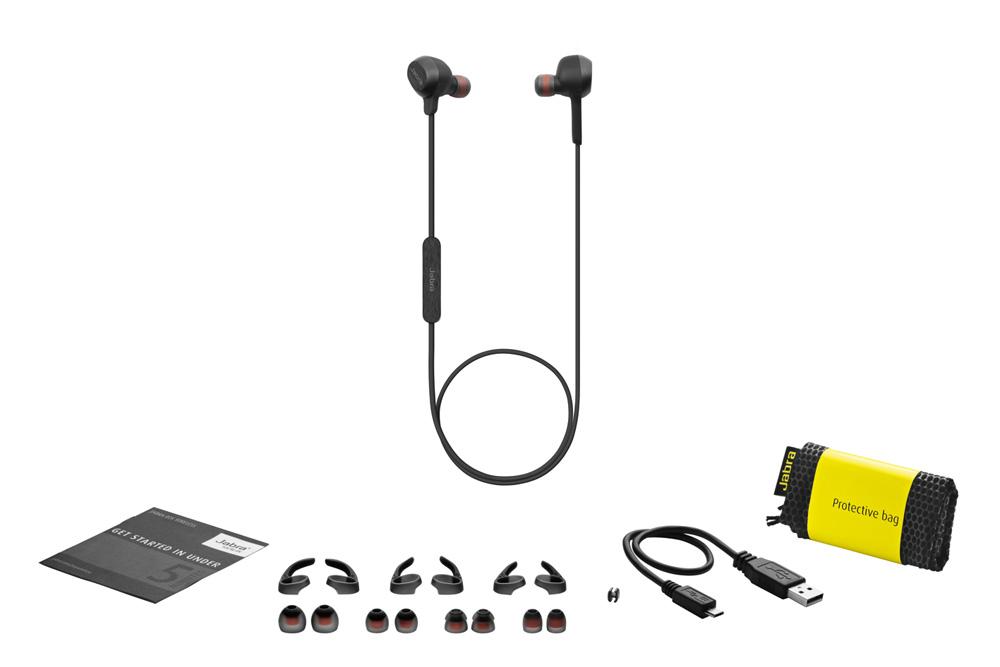
Packing list

More detail....

Adonit Jot 触控笔


  • Adonit Jot 为落笔精准而设计的触控笔。
  • 对于在手机或平板点脑上绘图的玩家们,肯定是一个绝佳利器。
  • 采用了 Palm Rejestion 智慧防手触功能,可将手腕自然平放在荧幕上,不会影响绘画
  • Adonit Jot 触控笔分别有 Jot Classic, Jot Mini, Jot Dampening Flip, Jot Pro Dampening 和 Jot Touch 4等系列。
  • 目前兼容所有电容式触控荧幕手机与平板,包过 iPad, iPhone, HTC, SAMSUNG, NOKIA, BlackBerry等。

Adonit Jot Touch 4 智慧感应笔(深灰色)
功能快捷键,简化切换步骤,提升创作效率。透过蓝牙与平板连接。
蓝牙4.0,冲电1.5小时,可持续使用100小时。
弹性笔触及多角度专利精准圆盘

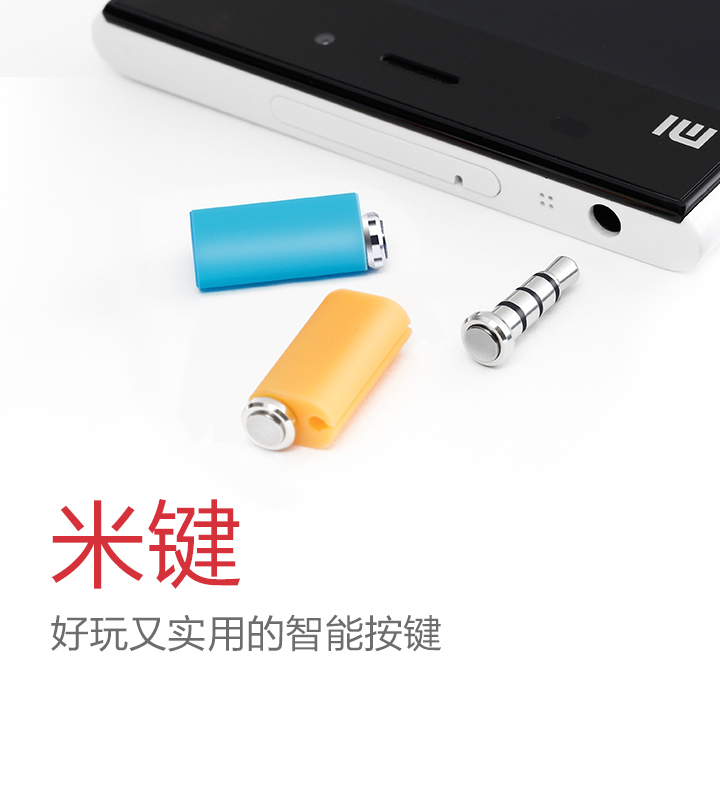
米键

  • 无需解锁手机,轻轻一按就可以一键拍照,录音,打开记事本,。。。。
  • 单击打开,长按退出。
  • 需安装米键APP配套使用。
  • 可以自由创造连击十次的不同应用设置。
  • 深度适配MIUI。
  • 可成为防尘塞。
  • 有白,蓝,黑,橙,粉红,绿色
了解更多。。。

其他类似产品:
  1. 快按钮
  2. 360智健

Moto 360

It’s time for Moto 360, designed by Motorola, powered by Android Wear.
  • Weather forecast
  • Notification- let you up to date
  • GPS
  • Bluetooth
  • Android 4.3 and 4.4 compatible
  • Still look like a normal watch 

Coming summer 2014 with a selection of styles.

How to take a screen capture in Windows?

Screen capture = Screen shot = Print your screen

Screen shot the entire screen

  1. Press "Prt Sc" or some computer need press "FN" + "Prt Sc"
  2. Open "Paint" by clicking Start > All Programs > Accessories > Paint 
  3. On the "Home tab", in the "Clipboard group", click "Paste"
  4. You can resize the image
  5. Save the image

Screen shot the active window

  1. Press "ALT" + "Prt Sc" or some computer need press "FN" + "ALT" + "Prt Sc"
  2. Open "Paint" by clicking Start > All Programs > Accessories > Paint 
  3. On the "Home tab", in the "Clipboard group", click "Paste"
  4. You can resize the image
  5. Save the image

Saturday, 17 May 2014

12个Excel技巧让你变成达人

  1. 如何快速定位到单元格?
  2. “CTRL + * ” 的特殊功用
  3. 如何在不同单元格中快速输入同一数内容?
  4. 如何让屏幕上的工作空间变大?
  5. 如何使用快显菜单?
  6. 如何防止Excel自动打开太多文件?
  7. 如何快速格式化报表?
  8. 如何为表格添加斜线?
  9. 如何定义自己的函数?
  10. 如何使单元格中的颜色和底纹不打印出来?
  11. 工作表保护的口令忘记了怎么办?
  12. 如何减少重复劳动?

Saturday, 26 April 2014

Alcatel Hero


(Photo took from GSMARENA)


back to top